
Découvrez le Web Sans frontières.
Faites instantanément transiter le trafic de votre navigateur via des serveurs proxy résidentiels sécurisés sur les marchés internationaux. Vérifiez les prix régionaux, accédez à du contenu localisé et testez des sites web géolocalisés en un seul clic.
Essai gratuit de 10 jours (150 Mo max.). Carte bancaire requise pour l'inscription via Stripe. Annulation possible à tout moment.
Capacités de base
Conçu pour la transparence et la performance
Un utilitaire de navigation épuré, conçu pour la précision, la sécurité et la gestion multi-appareils.
Routage proxy global en 1 clic
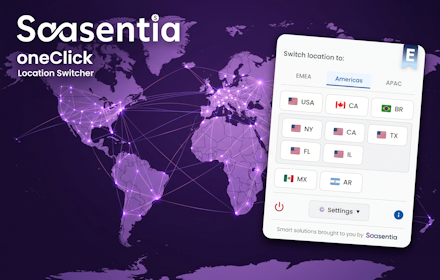
Acheminez instantanément les requêtes des navigateurs actifs via notre réseau IP résidentiel étendu couvrant les Amériques, la zone EMEA et la zone APAC. Connectez-vous via un routage global au niveau du pays ou affinez votre accès grâce à un ciblage ultra-localisé au niveau de l'État américain.
Identifiant principal et autorisation des appareils enfants
Gérez facilement votre écosystème. Liez vos installations de navigateur secondaires à votre identifiant principal en quelques secondes et partagez votre abonnement premium et votre quota de données sur tous vos appareils.
Déconnexion automatique après 30 minutes d'inactivité
Ne gaspillez plus de bande passante. L'extension surveille l'état de la connexion et rétablit automatiquement la connexion native de votre navigateur après 30 minutes d'inactivité.
Confidentialité stricte et absence totale de journaux de trafic
Votre activité de navigation vous appartient exclusivement. Nous ne surveillons, ne stockons ni n'enregistrons les URL visitées, les requêtes DNS ou l'historique de navigation.
Changement de lieu sans interruption
Sélectionner le pays cible
Ouvrez l'interface contextuelle depuis votre barre d'outils et choisissez le drapeau de localisation souhaité.
Routage sécurisé
Le trafic de votre session active transite par des serveurs proxy résidentiels haut débit situés sur le marché cible.
Inspecter et déconnecter
Vérifiez le contenu ou le prix dans votre région, puis cliquez sur Déconnecter ou laissez le minuteur d'inactivité de 30 minutes se désactiver en toute sécurité.
Plans transparents
Choisissez votre niveau de données
Aucuns frais cachés ni engagement à long terme. Augmentez votre capacité instantanément ou modifiez votre forfait à tout moment pour le cycle de facturation suivant.
Essentials
Idéal pour des vérifications de prix occasionnelles et des recherches rapides.
- 150 Mo Limite de données mensuelle
- Sélection complète des pays internationaux
- Un seul appareil
- Pas de diffusion vidéo
Premium
Idéal pour la navigation, la recherche et le streaming réguliers.
- 600 Mo Limite de données mensuelle
- Autorisation multi-appareils
- Diffusion vidéo activée
- Vitesses réseau prioritaires
Ultimate
Conçu pour une utilisation intensive de données sur plusieurs appareils.
- 2000 Mo Limite de données mensuelle
- Autorisation multi-appareils
- Diffusion vidéo activée
- Stabilité des nœuds de niveau entreprise
Recharge de données Data+
Besoin de plus de données ? Ajouter 1000 Mo à votre solde actif à tout moment et instantanément.
* Tous les prix sont hors TVA locale. Les taux de taxe locaux applicables sont calculés automatiquement lors du paiement en fonction de votre lieu de facturation.
oneClick Location Switcher - Questions fréquentes
Général
🚀 Nouveautés de la version 2.0 de oneClick Location Switcher
Nous avons considérablement étendu notre présence mondiale et renforcé la sécurité de notre réseau dans notre plus importante mise à jour à ce jour !
🌍 Expansion massive du réseau mondial
- De l'Europe au monde : Nous avons étendu notre réseau de mandataires de 12 pays européens à une vaste liste mondiale couvrant trois régions : les Amériques, la zone EMEA et la zone APAC.
- Nouvelle interface à onglets : Pour une meilleure organisation, la fenêtre contextuelle propose désormais une interface utilisateur élégante à onglets, permettant de passer rapidement d'une région à l'autre.
- Ciblage au niveau des États américains : Besoin d'un accès hyper-local ? Vous pouvez désormais explorer des États américains spécifiques (NY, CA, TX, FL, IL) directement depuis l'onglet Amériques.
🛡️ Sécurité et filtrage améliorés
- Protection avancée du contenu : En plus de nos bloqueurs de médias existants, la version 2 intègre un nouveau moteur de filtrage réseau complet. Nous bloquons désormais activement les requêtes vers les sites d'hameçonnage, les logiciels malveillants et autres domaines dangereux afin de garantir l'intégrité du proxy et de protéger votre navigation.
⚙️ Stabilité et réparations sous le capot
- Processus de paiement plus fluide : Nous avons résolu un problème où le tunneling proxy pouvait interférer avec les pages de facturation. L'extension déconnecte désormais automatiquement et en toute sécurité votre tunnel proxy actif avant d'ouvrir les pages de rechargement ou de gestion des forfaits Stripe, garantissant ainsi une expérience de paiement optimale.
Comment fonctionne l'autorisation des appareils avec l'identifiant principal ?
Chaque installation d'extension génère un identifiant unique. Dans le menu ‘ Gérer les appareils ’ de la fenêtre principale de votre extension, vous pouvez coller l'identifiant d'un navigateur secondaire pour l'autoriser sur votre compte principal sans avoir à partager vos identifiants de connexion. Remarque : Cette fonctionnalité est réservée aux abonnés Premium et Ultimate.
Comment puis-je utiliser mon abonnement sur plusieurs appareils ?
La prise en charge multi-appareils est une fonctionnalité exclusive à nos abonnés Premium et Ultimate. Pour associer un nouvel appareil (comme un ordinateur portable) à votre compte principal :
1. Installez l'extension sur votre nouvel appareil et copiez l'“ ID de l'appareil actuel ” situé en bas de la fenêtre contextuelle.
2. Ouvrez l'extension sur votre appareil Premium principal.
3. Cliquez sur “ Gérer les appareils ” et collez le nouvel identifiant dans le champ d’autorisation. Les deux appareils partageront désormais le même réseau proxy premium et utiliseront le même forfait de données.
Pourquoi n'est-ce pas gratuit comme d'autres extensions VPN ou proxy ?
La plupart des outils “ gratuits ” utilisent des adresses IP de centres de données facilement repérables, qui sont instantanément bloquées par les principaux sites de commerce électronique et de voyage. Pire encore, de nombreux réseaux gratuits suivent et vendent secrètement vos données de navigation pour financer leurs serveurs. Nous utilisons des proxys résidentiels premium : vous vous connectez ainsi via de véritables réseaux domestiques à travers le monde, ce qui vous évite tout blocage. Nous facturons un petit abonnement mensuel pour garantir votre confidentialité, maintenir des serveurs à haut débit et ne jamais vendre vos données.
Pourquoi le bouton “ Démarrer l’essai ” clignote-t-il en rouge lorsque je clique sur un drapeau ?
Ce message de notre système vous informe que vous n'avez actuellement aucun abonnement. Vous devez activer votre essai gratuit avant de pouvoir vous connecter à notre réseau proxy international sécurisé.
Pourquoi n'y a-t-il pas de streaming vidéo sur les sites que je visite ?
Pour les formules Essai gratuit et Essentiel, le streaming vidéo est bloqué afin de préserver votre forfait de données. Pour activer cette fonctionnalité, vous pouvez passer à nos formules Premium ou Ultimate.
Je me suis connecté à un pays, mais lorsque je fais une recherche sur Google, je vois toujours mon pays d'origine. Y a-t-il un problème ?
Non, ça fonctionne parfaitement ! Google est extrêmement vigilant quant au suivi de votre localisation. Si vous êtes connecté à un compte Google/Gmail ou si d'anciens cookies Google sont enregistrés, Google ignorera votre nouvelle adresse IP et vous affichera des résultats basés sur votre historique de navigation. Le test ultime : rendez-vous directement sur un site de vente en ligne international comme Zara.com ou Amazon. Ces sites ne vous suivent pas comme Google, et vous constaterez que la devise et la boutique changent instantanément !
Pourquoi est-ce que je vois encore parfois des publicités ou des prix locaux sur Google et Amazon après avoir changé de pays ?
Les principales plateformes utilisent des scripts asynchrones très performants pour afficher des publicités et des tarifs ciblés. Lorsque vous changez de localisation, les principaux résultats de recherche s'actualisent immédiatement vers votre nouveau pays, mais il arrive que des scripts publicitaires en arrière-plan restent connectés à votre ancienne connexion pendant quelques secondes. Nous utilisons un mécanisme de purge automatique du cache pour minimiser ce phénomène. Si toutefois des publicités locales persistent, il vous suffit d'actualiser la page une nouvelle fois pour forcer le réseau publicitaire à utiliser la nouvelle localisation.
Je me suis connecté à un site web d'un autre pays, mais celui-ci est toujours dans ma langue locale.
Non, le proxy fonctionne parfaitement ! Ce que vous voyez est la fonction de traduction automatique de votre navigateur. Les navigateurs modernes comme Chrome et Edge détectent automatiquement les langues étrangères et traduisent le texte de la page dans la langue de votre ordinateur. Pour voir le site web exactement comme un utilisateur local : repérez l’icône de traduction (Google Traduction ou similaire) dans la barre d’adresse de votre navigateur, cliquez dessus et sélectionnez “ Afficher l’original ”.
Mes données et mes informations de paiement sont-elles sécurisées ?
Oui, absolument. Tous les paiements sont gérés exclusivement par Stripe.
Comment puis-je être sûr que le sélecteur de localisation en un clic fonctionne réellement ?
C'est incroyablement facile à vérifier ! Il suffit d'ouvrir un nouvel onglet et d'accéder à un service indépendant de vérification d'adresse IP, tel que IPinfo.io, WhatIsMyIPAddress.com, ou IPLeak.net
Une fois la page chargée, ouvrez l'extension OneClick et cliquez sur le drapeau du pays souhaité. L'extension redirigera instantanément votre connexion et actualisera automatiquement la page. Votre adresse IP, votre fournisseur d'accès Internet et votre localisation géographique s'afficheront immédiatement et correspondront au pays sélectionné.
(Remarque : comme nous utilisons un vaste réseau d'adresses IP résidentielles dynamiques, la ville affichée peut parfois varier, mais votre empreinte numérique correspondra toujours strictement au pays que vous avez sélectionné).
Abonnements et facturation
Comment fonctionne l'essai gratuit ?
Lorsque vous installerez l'extension, votre statut affichera “ Aucun abonnement ” (N). En cliquant sur “ Démarrer l'essai gratuit de 10 jours ”, vous serez redirigé vers notre page de paiement sécurisée fournie par Stripe. Aucun prélèvement ne sera effectué aujourd'hui. Pendant votre période d'essai, un “ T ” turquoise apparaîtra à l'écran. Après 10 jours, vous passerez à l'abonnement Essentiel (E) pour seulement 1,19 € par mois (HT – taux local).
Que se passe-t-il lorsque j'atteins ma limite mensuelle de données ?
Votre solde de données est visible directement dans la fenêtre contextuelle de l'extension. Dès que votre solde atteint 0 Mo, le routage proxy actif est automatiquement suspendu jusqu'à la date de renouvellement mensuel ou jusqu'à ce que vous cliquiez sur ‘ Recharger les données ’ pour acheter des données supplémentaires ou sur ‘ Gérer le forfait ’ pour changer de forfait. Ces deux fonctionnalités sont gérées par Stripe.
J'ai acheté une recharge de données pour mon ordinateur portable, mais elle n'apparaît pas sur mon PC principal. Que s'est-il passé ?
Si vous avez connecté plusieurs appareils via la fonction “ Gérer les appareils ”, toutes les transactions sont automatiquement transférées vers votre compte principal. Il vous suffit de fermer puis de rouvrir l’extension sur votre ordinateur principal pour que votre solde soit instantanément mis à jour.
Quelle est la durée minimale d'abonnement ?
Vous pouvez souscrire à l'un de nos forfaits pour une durée fixe d'un mois. L'abonnement est automatiquement renouvelé pour un mois supplémentaire à la fin de la période, sauf si vous le résiliez via l'option « Gérer mon forfait ».
Comment puis-je passer à un abonnement supérieur, rétrograder ou annuler mon abonnement ?
Vous pouvez gérer votre forfait à tout moment via le portail de facturation Stripe depuis votre tableau de bord. Mises à niveau Elles prennent effet immédiatement afin que vous puissiez continuer à naviguer. Déclassements et annulations La modification prendra effet à la fin de votre cycle de facturation mensuel actuel. Aucun remboursement partiel n'est accordé pour les annulations en cours de mois, mais vous conserverez l'accès complet à vos données restantes jusqu'à la fin du cycle.
Mes données non utilisées sont-elles reportées au mois suivant ?
Non. Afin de maintenir notre réseau haut débit et de proposer des tarifs d'abonnement aussi bas que possible, votre solde de données (y compris les recharges Data+) est remis à zéro au début de chaque cycle de facturation mensuel. Les données non utilisées ne sont pas reportées.
Aspects techniques
L'extension va-t-elle ralentir ma connexion internet ?
Comme nous utilisons des serveurs proxy résidentiels de haute qualité pour contourner les restrictions géographiques, vous pourriez constater un léger délai par rapport à votre connexion internet directe. Ceci est normal. Nous vous recommandons d'activer l'extension pour consulter les prix et ajouter des articles à votre panier, et de la désactiver (déconnexion) pour la navigation générale.
Dois-je désactiver le proxy une fois que j'ai terminé ?
Vous pouvez facilement rétablir votre connexion internet principale en cliquant sur le bouton rouge “ Déconnexion ”. Toutefois, pour garantir des performances optimales et économiser vos données, l’extension oneClick est dotée d’une fonction de coupure automatique. Elle se déconnectera automatiquement et vous rétablira votre connexion habituelle après 30 minutes.
Pourquoi certains sites web affichent-ils encore ma région par défaut ?
Si vous êtes connecté à un profil de site persistant (comme un compte Google) ou si des cookies de localisation sont en cache, le site peut privilégier l'historique de votre profil à votre localisation IP. Ouvrir une fenêtre de navigation privée ou supprimer les cookies de ce domaine résout immédiatement ce problème.
J'ai réinstallé mon navigateur ou j'ai un nouvel ordinateur. Comment puis-je restaurer mon compte ?
Parce que nous accordons une grande importance à la protection de votre vie privée et n'utilisons pas de mots de passe traditionnels, l'identifiant de votre appareil d'origine sert de clé de récupération principale. Il est de votre responsabilité de le sauvegarder immédiatement après votre inscription, dans un endroit sûr (par exemple, un gestionnaire de mots de passe). Si vous perdez votre session, il vous suffit d'installer une nouvelle copie de l'extension, de cliquer sur “ Vous avez perdu votre compte ? Restaurez-le ici ” en bas du menu, puis de saisir l'identifiant de votre appareil d'origine ainsi que votre adresse e-mail de facturation.
Pourquoi l'extension affiche-t-elle parfois “ Aucun abonnement ” pendant une fraction de seconde lorsque je l'ouvre ?
Pour une navigation rapide, l'extension charge instantanément votre dernier solde de données enregistré sur votre disque dur local avant de vérifier discrètement votre abonnement actif auprès de notre base de données en arrière-plan. En cas de ralentissement momentané de votre connexion Internet, l'affichage de votre statut premium peut prendre une fraction de seconde.
Besoin d'assistance technique ?
Notre équipe d'assistance est disponible pour vous aider avec la configuration ou la liaison de votre compte.
support@saasentia.com